S2 Pass
- 4.8
- Rating
- 50.00K
- Installs
- Free
- Price

 Analysis by App-foxy
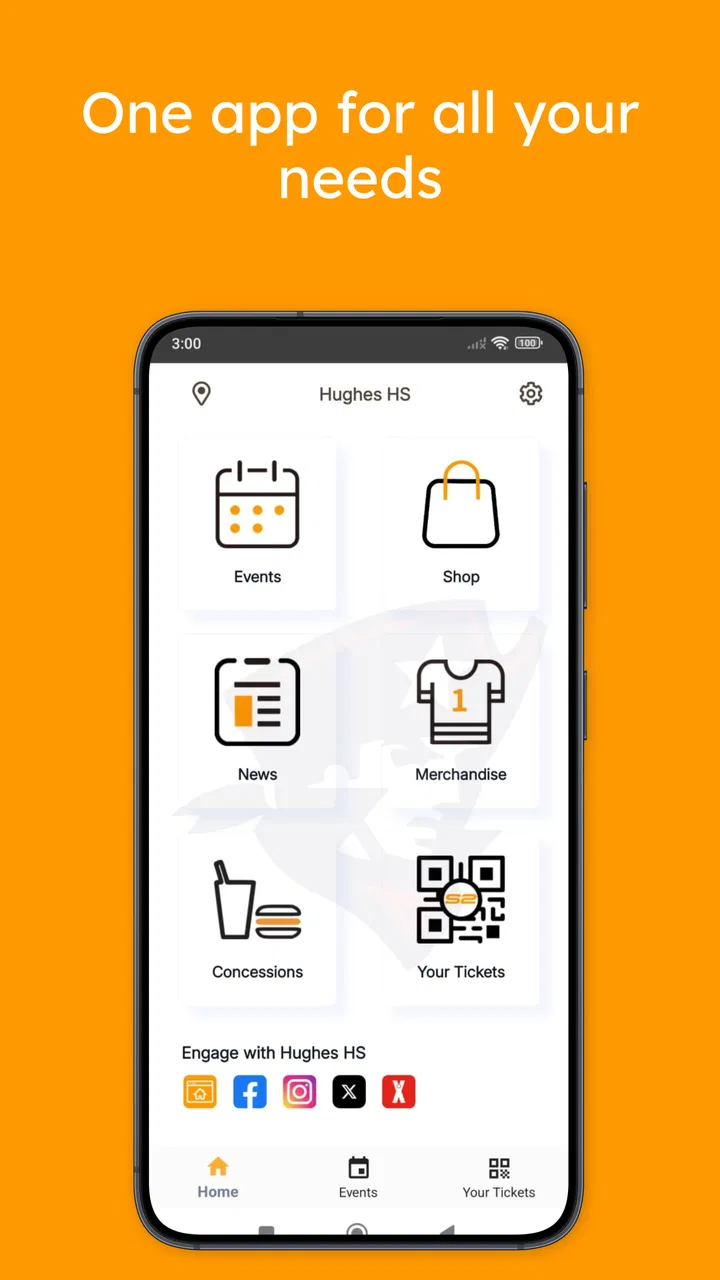
I approached S2 Pass as a practical school-community app rather than as a general sports platform. Its purpose sits at the intersection of school administration and everyday participation: users can handle ticket purchases, pay school fees, and keep in touch with their school community from one place. That combination makes it potentially useful for families who would otherwise move between paper notices, payment pages, and separate event arrangements.
My overall impression is positive, but with an important qualification: the app’s value depends heavily on whether your school actually uses it as part of its routine. It is free, aimed at Everyone, and developed by S2 Pass. The current release is version 1.4.6, and it supports Android devices running Android 6.0 or later. Those details make it approachable for many households, including people using older phones, although the age of a device can still affect comfort and responsiveness in daily use.
The app has an average rating of 4.8 from around 187 ratings, with roughly 30 written reviews and over 50 thousand installs. Those figures suggest that the people who find it relevant generally respond well to it. I would not treat the rating as proof that every school workflow is effortless, though. A school-payment app can feel excellent when the institution has organized its information clearly, and frustrating when the surrounding process is unclear.
You May Also Like

 Pandora - Music & Podcasts
Pandora’s Music Is Easy to Start, but Harder to Recover
Pandora’s strength is its low-effort path from a seed to a station. Its weak spot is how much confidence it asks you to place in connection, setup, and quiet recovery.

 8 Ball Pool
 Is Built on Rivalries, Rematches, and Routine
A close look at the rivalries, rematches, shared routines, and unanswered safety questions that turn a quick pool match into a persistent mobile community.

 Samsung Music
’s Quiet Strength Is Playing What You Already Own
Its reach comes less from spectacle than from dependable access to a personal library. That simplicity is both the app’s strongest retention engine and its ceiling.

 AccuWeather: Weather Radar
AccuWeather Review: A Quick, Clear Forecast for Everyday Decisions
For everyday plans, the best forecast is the one you can understand quickly. AccuWeather makes rain timing, radar, and local conditions easy to act on, with a few trade-offs.

 Hill Climb Racing
Why Hill Climb Racing Still Turns Crashes Into One More Run
A tiny car, a bumpy hill and one more upgrade: Hill Climb Racing keeps resurfacing because its simple chaos makes every near-miss feel personal.

 AliExpress - Shopping App
AliExpress Makes Global Shopping Feel Personal, but Shoppers Bear the Risk
AliExpress turns a global marketplace into a pocket-sized discovery engine. Its reach is useful, its shopping loop compelling, and its trade-offs easy to miss.
More From Our News Desk
View All News


How clearly the app supports different users
I look at S2 Pass through the question of how well one school-centered app can serve people with different routines and abilities. In this section, I focus on the practical difference between having tickets, fees, and community information gathered together and having a process that is genuinely easy for each person to use. That distinction matters most when a household shares school responsibilities or needs extra time to complete a task.
Readability and navigation in a school setting
The strongest design idea behind S2 Pass is concentration. Instead of asking a parent to remember a separate place for event tickets, another route for school charges, and a third channel for school communication, it brings those needs into the same app. That matters more than it may sound. When a task is connected to a child’s school, the user is often working quickly between other responsibilities, so reducing the number of places to check can make the process easier to understand.
I find this especially useful for routine tasks that are easy to postpone. A fee notice can be dealt with while it is still in front of me, and an event ticket can be handled without searching through old messages for the correct instructions. The app’s role is not just convenience; it can also provide a clearer mental map of school-related responsibilities.
At the same time, a unified app can become confusing if several types of information compete for attention. Tickets, payments, and community updates are different activities. A user looking for a receipt does not want to scan through event content, while someone checking an announcement should not have to think about payment steps first. In my view, the quality of the experience depends on whether these areas are visibly separated and named in plain language.
For a first-time user, I would recommend opening the app when there is no immediate deadline. Explore where tickets, fees, and school messages live before a busy morning or an event entrance. This small preparation step is one of the most useful ways to reduce pressure, particularly for someone who is less comfortable with mobile services or who needs extra time to interpret each screen.
Readability is also about context. A parent may be using the app while standing outside a school, a student may be checking an event detail between activities, and another family member may be managing payments on a smaller phone. Short labels and predictable movement between sections matter in all of these situations. I would value a layout that makes the next action obvious rather than relying on icons that require guessing.
Another practical point is shared household use. School responsibilities are not always handled by the same person every day. One adult may buy a ticket, another may pay a fee, and a student may need to show event information. Keeping the app’s purpose focused can help those handoffs, but users should still establish a simple household habit: decide who completes a transaction and where confirmation information will be checked afterward.
Motor and sensory considerations
S2 Pass can support a broad range of everyday users simply because it places several school tasks in one mobile environment. People who find repeated paper forms tiring may prefer entering information once on a phone. Someone with limited time or reduced stamina may appreciate not having to travel to a school office for every routine payment or ticket request. These are meaningful benefits even without making assumptions about a user’s specific needs.
However, I would not describe the app as automatically accessible for every ability. A mobile interface still asks users to tap accurately, read content on a relatively small screen, and distinguish between actions such as viewing information and completing a payment. Those demands can be difficult for people with limited dexterity, tremors, visual fatigue, or sensitivity to dense screens.
My practical advice is to use the phone’s own display settings where helpful, such as larger text or increased contrast, and then check whether the app remains comfortable to read. System-level adjustments can improve legibility, but they may also cause labels to wrap or controls to become less convenient. That is why I would test the most important workflow before relying on it for a time-sensitive ticket or fee.
People with visual impairments may also need to evaluate how well the app works with their preferred device settings or assistive tools. I would avoid assuming that every control is equally easy to identify or that every screen behaves perfectly with accessibility features. If a payment or ticket must be completed by a particular deadline, having a trusted person available as backup is sensible until the user has confirmed that the full process works comfortably.
For users with hearing differences, the app’s value may come from having school-related information available in written form rather than depending solely on conversations or announcements. That can make details easier to revisit. Still, written communication only helps when the message itself is clear, current, and easy to locate, so the school’s publishing habits remain part of the experience.
Users with cognitive or learning differences may benefit from the app’s narrow purpose, but payment workflows can still create uncertainty. I would take screenshots or note the sequence of steps only for personal reference, and I would check the final confirmation before closing the app. The important distinction is between starting an action and knowing that it has actually finished.
Using S2 Pass in real situations
A realistic example is a weekday evening before a school event. I might receive a reminder that tickets need attention, open S2 Pass, complete the purchase, and then return later to check the event information. The advantage is that the task stays connected to the school community instead of becoming a loose collection of messages and payment pages. If another family member is taking the child, the relevant information can be reviewed together before leaving home.
Another scenario involves school fees. A parent who normally works during office hours may prefer handling the payment from home rather than arranging a visit or searching for a physical form. The app is most useful here when the fee information is presented in a way that makes the amount, purpose, and next step easy to understand. If any of those details are ambiguous, the convenience of mobile payment is reduced because the user may need to contact the school anyway.
For students, the community side can be useful when school information is scattered across informal channels. A single place to check can reduce the chance of missing a ticket opportunity or an update. I would still encourage students to confirm important details with a parent or school contact when money or attendance is involved. The app can organize the process, but it should not replace sensible verification.
It may also help users who are new to a school community. Families who have recently joined a school often do not know which office handles which request. A focused app can provide a more consistent starting point than asking several people for different instructions. The benefit is greatest when the school treats the app as an official, regularly maintained channel rather than an occasional extra.
Situational access includes connectivity, battery, and device comfort. A user may be able to complete a task at home but struggle at a crowded event entrance with a dim screen, low battery, or poor signal. I would open the relevant ticket or confirmation before leaving and avoid assuming that the last-minute environment will be ideal. This is not a criticism unique to S2 Pass; it is a sensible habit for any app used to prove entry or complete a time-sensitive task.
The app is also less compelling for people whose school does not use its payment and communication functions consistently. In that case, the user may still need email, paper notices, or a separate school portal. Installing it alone cannot create a complete school workflow. The institution’s adoption is therefore a practical requirement, not a minor detail.
Where friction can remain
The first barrier is dependency on the school community. S2 Pass is not a universal ticket wallet or a general-purpose fee manager. Its usefulness comes from the relationship between the app and a participating school environment. If your school sends only occasional information through it, you may not gain enough value to justify making it part of your routine.
The second barrier is the seriousness of payment tasks. Users need confidence about what they are paying for, whether the action has completed, and how to find the relevant confirmation afterward. I would not close the app immediately after tapping a final button. Take a moment to check for a clear completion state, and keep any confirmation information available until the school event or fee matter is settled.
A third issue is the difference between digital access and understandable access. An app can put a service on a phone while still leaving users unsure about terminology, deadlines, or responsibilities. Families who speak different languages, share devices, or rely on another person for digital tasks may need especially clear school instructions alongside the app. S2 Pass can be part of an inclusive process, but it cannot solve unclear communication from the institution.
Older Android support is a welcome practical detail because the minimum requirement is Android 6.0. Even so, support on paper does not guarantee the same comfort on every older handset. A device with a small display, limited storage, or slower performance may make reading and navigation harder. I would install it ahead of time and complete a low-pressure check rather than waiting until a ticket or payment is urgent.
There is also a trade-off in putting several responsibilities together. Consolidation reduces app switching, but it means that a problem in one part of the experience can affect several school tasks. Someone who prefers separate, highly specialized services may find a dedicated ticketing system or a school’s established payment portal more straightforward. In my experience, S2 Pass makes more sense for users who value one school-centered destination than for users who want maximum control over each individual function.
Privacy and trust are part of the decision whenever an app handles school communication or payments. I would read the school’s instructions carefully, use a personal device lock, and avoid completing sensitive transactions on a shared public device. These habits do not depend on a particular feature; they are sensible safeguards when children, families, and money are connected in one digital space.
Who should choose it, and who should look elsewhere?
I would recommend S2 Pass to families whose school actively uses it for tickets, fees, and community updates. It is a good fit for parents who want fewer scattered school tasks, students who need a central place to check relevant information, and households that prefer handling routine administration from a phone. It can also suit people who appreciate written, revisitable information instead of relying entirely on conversations or printed notices.
I would be more cautious if you need extensive customization for accessibility, if you regularly use assistive technology that requires carefully tested controls, or if your school provides only partial information through the app. In those cases, ask the school how the app fits into the wider process before depending on it. A separate portal, direct school contact, or another established method may be better for a particular task.
I would also skip making it your primary school tool if you dislike combining payments and community information in one place. Some users find a single hub reassuring; others prefer a dedicated payment service with a narrow purpose. Neither preference is wrong. The right choice depends on whether the app’s organization matches the way your household already manages school responsibilities.
Because it is free and rated for Everyone, trying it is relatively low-risk from a cost and age standpoint. Still, I would judge it by a complete workflow rather than by installation alone: locate a school update, identify a fee, review a ticket process, and confirm that the text and controls are comfortable for the people who will actually use them. That test reveals more than a quick glance at the opening screen.
My inclusive verdict
S2 Pass is a focused sports-and-school community app with a sensible everyday purpose. I like the idea of bringing tickets, school fees, and communication into one place because it addresses a real source of household friction: important tasks often arrive through too many channels. The app’s strongest quality is this practical connection between participation and administration.
Its support for different abilities and situations is promising but should be judged in context. Written access to school information can help many users, and remote fee or ticket handling can remove travel and timing barriers. On the other hand, small-screen interaction, payment confirmation, device differences, and unclear school instructions can still create obstacles. I would describe it as potentially inclusive when the school’s communication and support practices are strong, not as a complete accessibility solution by itself.
The developer, S2 Pass, has positioned the app around a specific community need rather than trying to be a general social network or broad sports utility. That focus is useful. I would install it if my school relies on it and spend a few minutes setting up a comfortable routine before an important deadline. My final recommendation is therefore positive for participating school communities, especially families seeking a single place for routine tasks, while users with more demanding access needs should test their complete workflow and keep an alternative contact route available.
FAQs for S2 Pass
01What is S2 Pass and what is it used for?
S2 Pass is a digital access and authentication application designed to help users manage entry credentials, passes, or identity-related access from a mobile device. Depending on the organization that provides it, the app may be used for events, buildings, services, or secure platforms. Before downloading, check which institution supports your pass, since the app’s available features can vary by provider and region.
02How do I activate or use my pass in S2 Pass?
After installing S2 Pass, users generally need to follow the activation instructions supplied by the organization that issued the pass. This may involve entering a code, scanning a QR code, signing in with an account, or confirming personal information. Make sure your phone has internet access during setup and that the details match the information registered by the issuing organization to avoid activation problems.
03Does S2 Pass require an internet connection?
An internet connection is usually needed when registering the application, receiving a pass, synchronizing account information, or updating access permissions. Whether the pass can later be displayed or verified offline depends on how the issuing organization configured the service. For important entrances or appointments, open the pass in advance and keep your device charged rather than relying on last-minute connectivity.
04Is S2 Pass safe to use for personal or access information?
S2 Pass may handle information connected with identity, authorization, tickets, or controlled access, so users should install it only from an official app store or a link provided by the legitimate issuing organization. Review the permissions requested during setup and keep your phone protected with a screen lock. Avoid sharing activation codes, screenshots, or login details with other people.
05What should I do if my S2 Pass is not working or I lose my phone?
If the pass does not appear, fails to activate, or is rejected at the point of access, first check your connection, update the app, restart it, and confirm that your account or pass has not expired. If the problem continues, contact the organization that issued the pass, as it usually controls permissions and replacements. If your phone is lost, report it promptly and secure or deactivate the associated account.
Pros
- Quick access to supported services with a simple login flow.
- Extra verification helps protect accounts from unauthorized access.
- Useful for users who regularly access S2-compatible platforms.
- Can reduce the need to remember multiple account passwords.
- Authentication codes are generally faster than manual verification.]
- contras:[
Cons
- Limited usefulness outside services that support S2 Pass.
- Requires a compatible device and an active internet connection.
- Account recovery may be difficult if the registered device is lost.
- Setup can take extra time when permissions or verification are required.
- Some users may find repeated authentication prompts inconvenient.

S2 Pass
Gallery